Captun
In developmentNo release yet: build it from the source on GitHub

Share your internet. Steer every device.

Captun turns your computer into a smart hotspot. Phones, TVs and consoles connect over Wi-Fi, a cable or USB, and you decide where each one's traffic goes: straight out, through a VPN, or through a proxy.

  • No account
  • No root on the phone
  • Your own VPN or proxy
  • Rules, DNS and limits
WindowsLinuxmacOS (in progress)
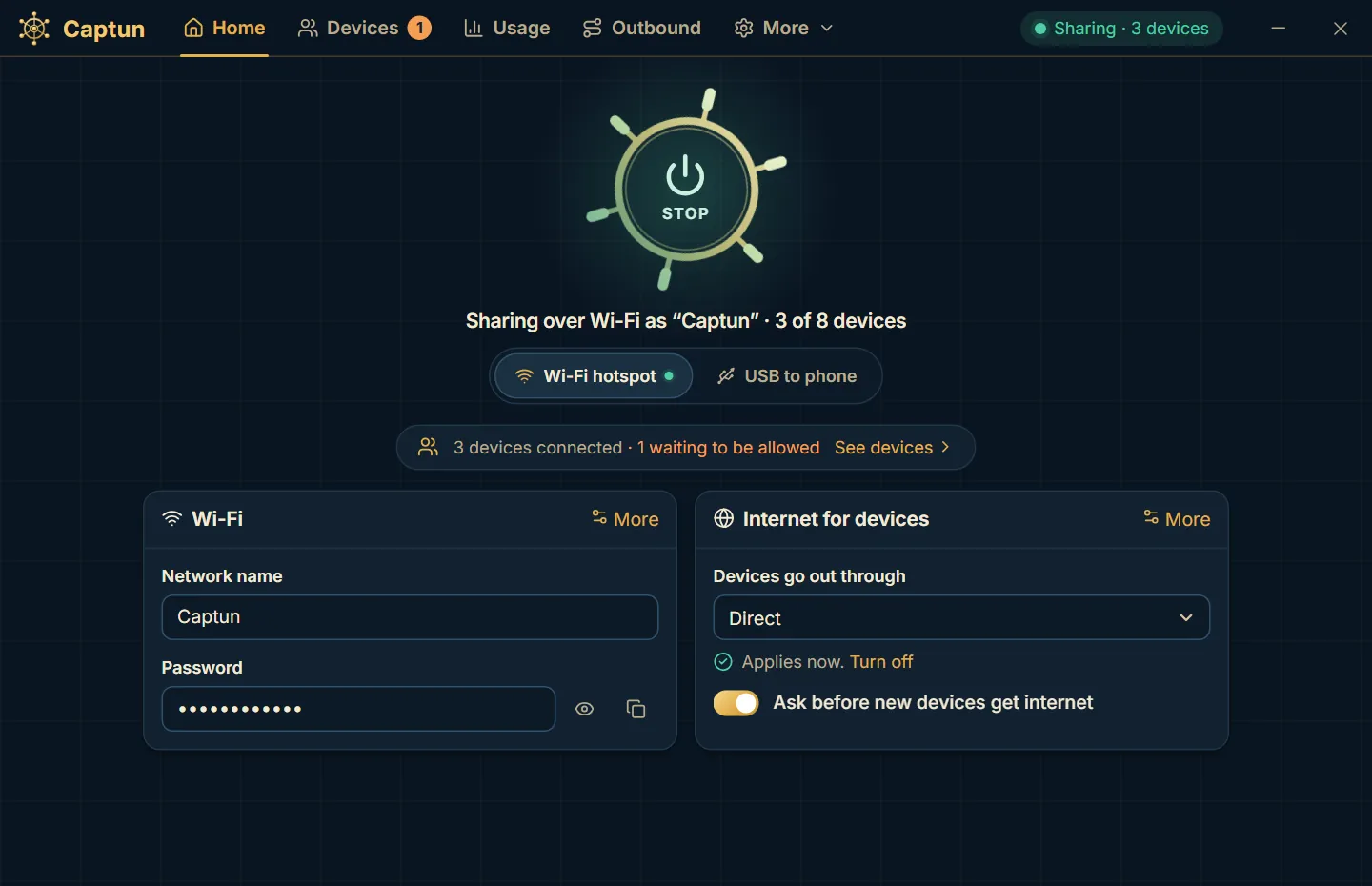
Captun on Windows: sharing over Wi-Fi with three devices connected and one waiting to be allowed
Your VPN, for every device Internet to a phone over USB Ad and tracker blocking

One app instead of

Windows' Mobile Hotspota VPN app on every devicereverse-tethering scriptsa separate DNS ad blockera router with custom firmwareCaptun
What you can do

One computer, every device online your way

Captun (captain + TUN) puts you at the helm of everything that connects to your computer.

Share a VPN with devices that can't run one

Connect your computer to a VPN or proxy once, and your smart TV, console or a guest's phone uses it through the hotspot.

Give a phone internet over USB

No mobile data, no Wi-Fi? Plug the Android phone into your computer and it goes online through it, with no root and no app on the phone.

Run a hotspot with your own rules

Block ads and trackers for every device, keep some websites off-limits, or send only certain websites through a proxy.

Keep an eye on every device

See who is connected and how much each one uses, approve new devices before they get online, block one, or set a speed limit.

How it works

Devices in, your route out

A small service with administrator rights runs the hotspot, a DNS server and a packet engine that decides, connection by connection, which way each device's traffic goes. The desktop app shows what is happening and changes the settings.

Your devicesPhonesTVs and consolesLaptopsTablets

Captun

Rules, DNS, limits

The way outDirectany network adapter: Ethernet, Wi-Fi, a VPN app's adapterVPN linkVLESS, VMess, Trojan, Shadowsocks, Hysteria2ProxySOCKS5, HTTP, HTTPS, also chained
Phones, TVs, consoles, laptops and tablets connect to Captun over a Wi-Fi hotspot, a cable or USB. Captun applies your rules, DNS and limits, and sends each device's traffic out directly, through a VPN link or through a proxy.
  1. Start sharing

    Press the helm: a Wi-Fi hotspot with your own network name and password, or USB to an Android phone.

  2. Add your ways out

    Your computer's network adapters are there already. Add a proxy, or paste a VPN link.

  3. Steer

    Choose the way out for each device or group, and add rules, DNS blocking, speed limits and allowances.

On Windows the engine captures devices' traffic with WinDivert, whose driver is signed by Microsoft; on Linux it uses a TUN network adapter and policy routing.

Connect

Wi-Fi, a cable or USB

Three ways for a device to get online through your computer.

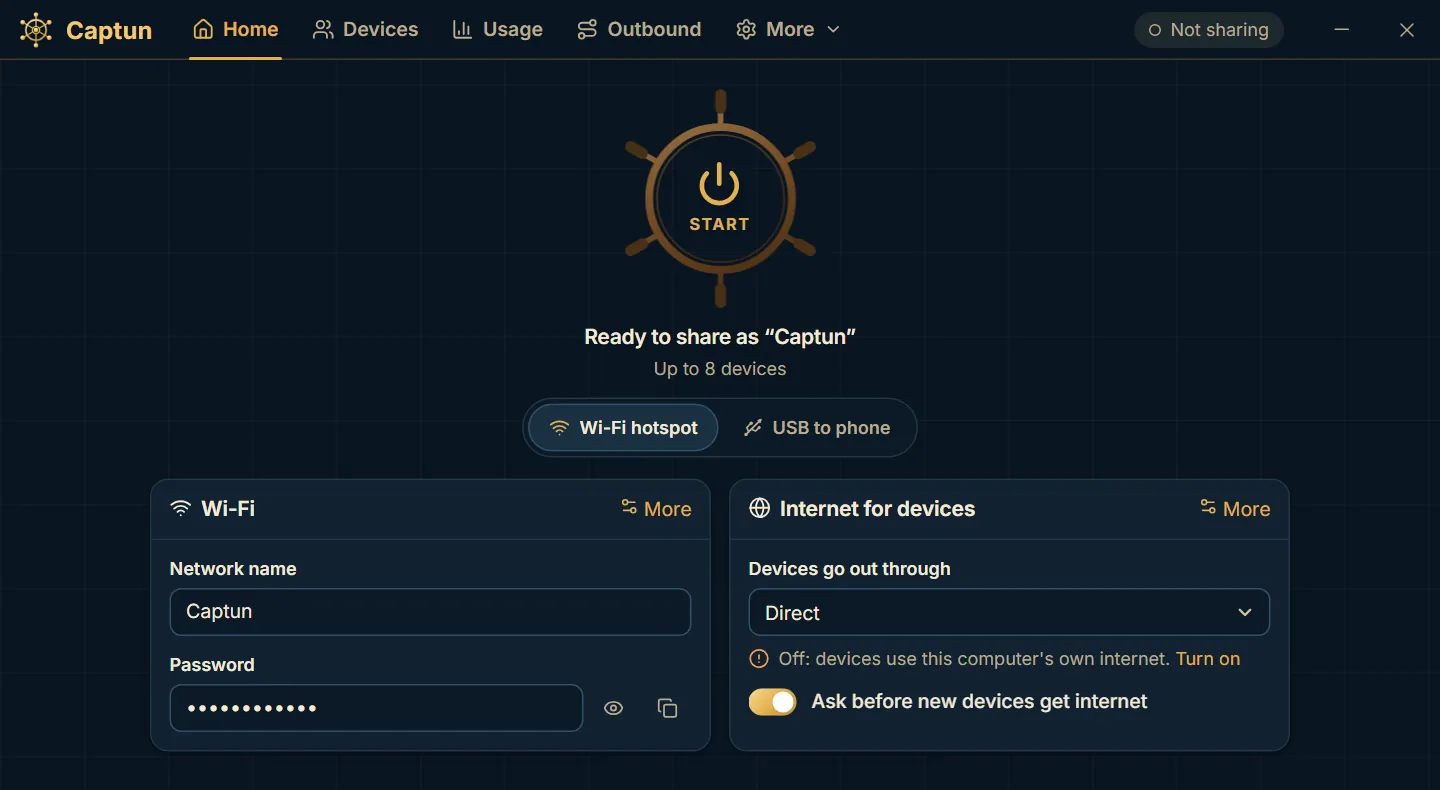
Captun ready to share as “Captun”, with the choice of Wi-Fi hotspot or USB to phone

Wi-Fi hotspot

Your own network name and password, a limit on how many devices may join, and new devices waiting until you allow them.

Cable sharing

Devices on a network cable or a USB network adapter get your internet, with their addresses handed out automatically (DHCP).

USB to an Android phone

Reverse tethering with no root and no app on the phone: Captun has adb built in. It only gives the phone internet and never uses the phone's. Web and apps work; games and calls don't yet.

What devices can reach

Keep them away from this computer, from each other or from your home network.

A closer look

Every device, its own way out

Every device in one list

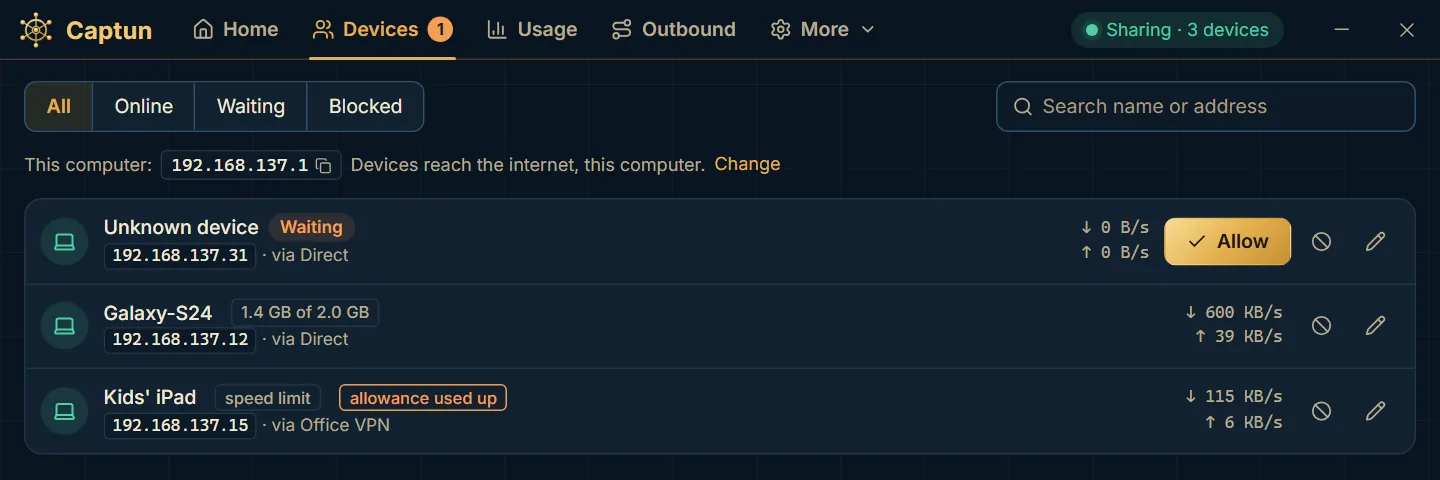
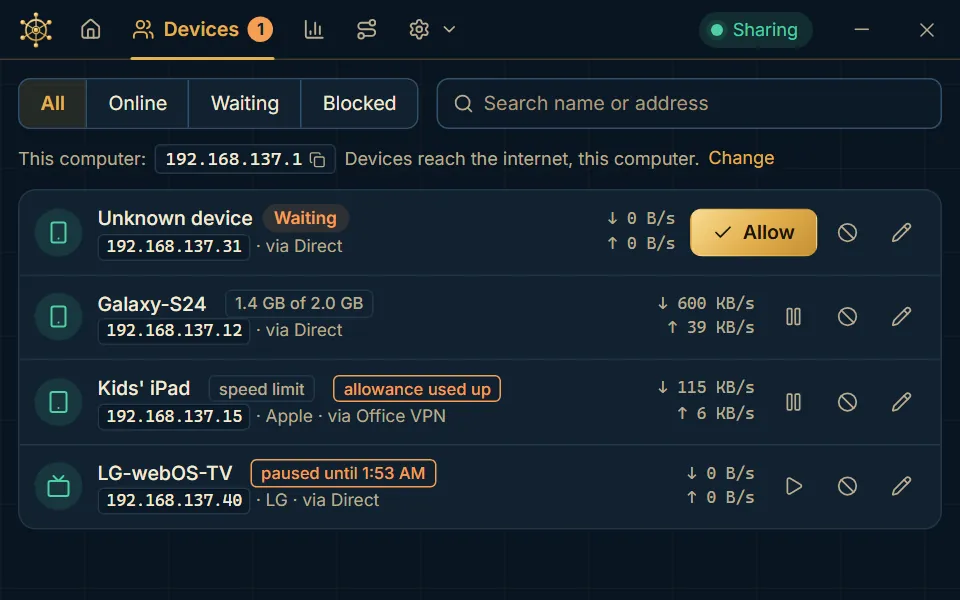
See who is connected, with live speeds, and step in before a new device gets online.

  • Allow a new device, or block one, with one click.
  • Download and upload speed for each device, as it happens.
  • Its own way out, speed limit and data allowance for each device.
  • Find a device by name or address.
The Devices page: one device waiting to be allowed, a phone near its data allowance and a tablet with a speed limit

Direct, a VPN or a proxyExperimental

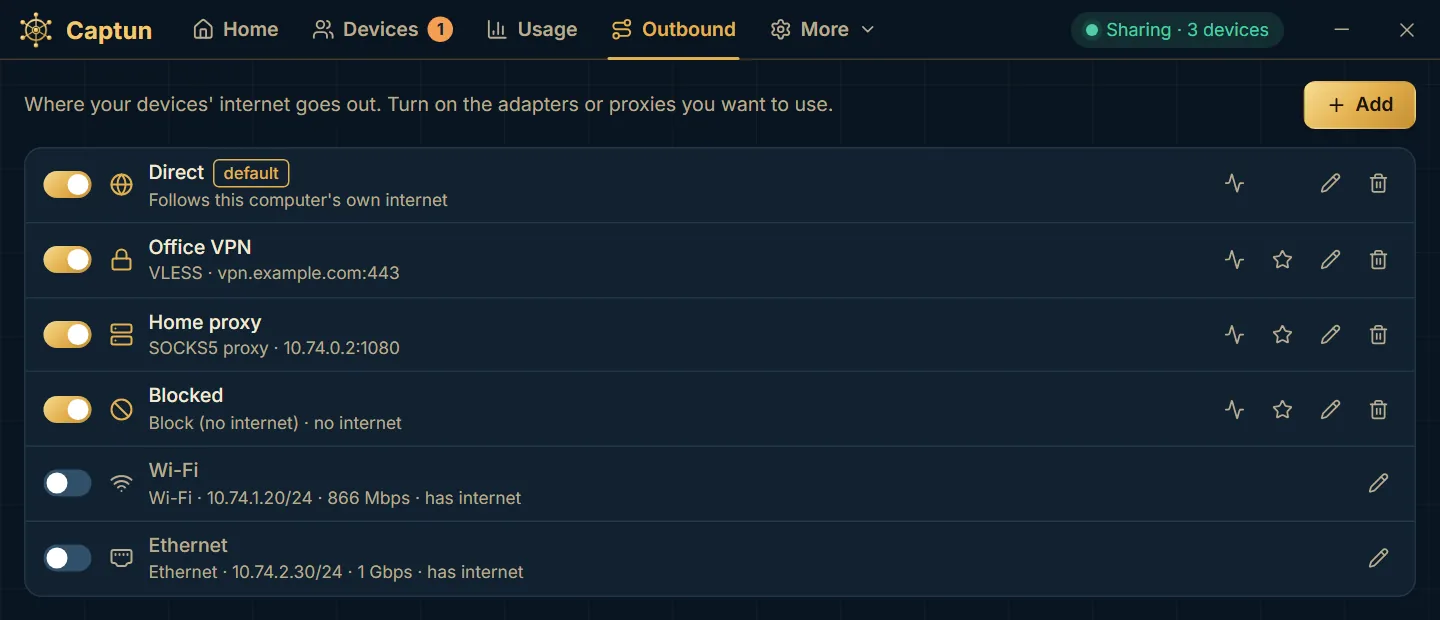
Each device or group goes out the way you choose. Turn on the ones you want to use.

  • Any network adapter of your computer: Ethernet, Wi-Fi or a VPN app's adapter.
  • SOCKS5, HTTP and HTTPS proxies, also in a chain.
  • VPN links you paste: VLESS (with REALITY), VMess, Trojan, Shadowsocks and Hysteria2, run by the bundled Xray-core.
  • If a way out stops working, Captun can cut the internet rather than send traffic another way.
The Outbound page: direct, a VLESS link, a SOCKS5 proxy and a blocked outbound, with the computer's Wi-Fi and Ethernet adapters

Rules that steerExperimental

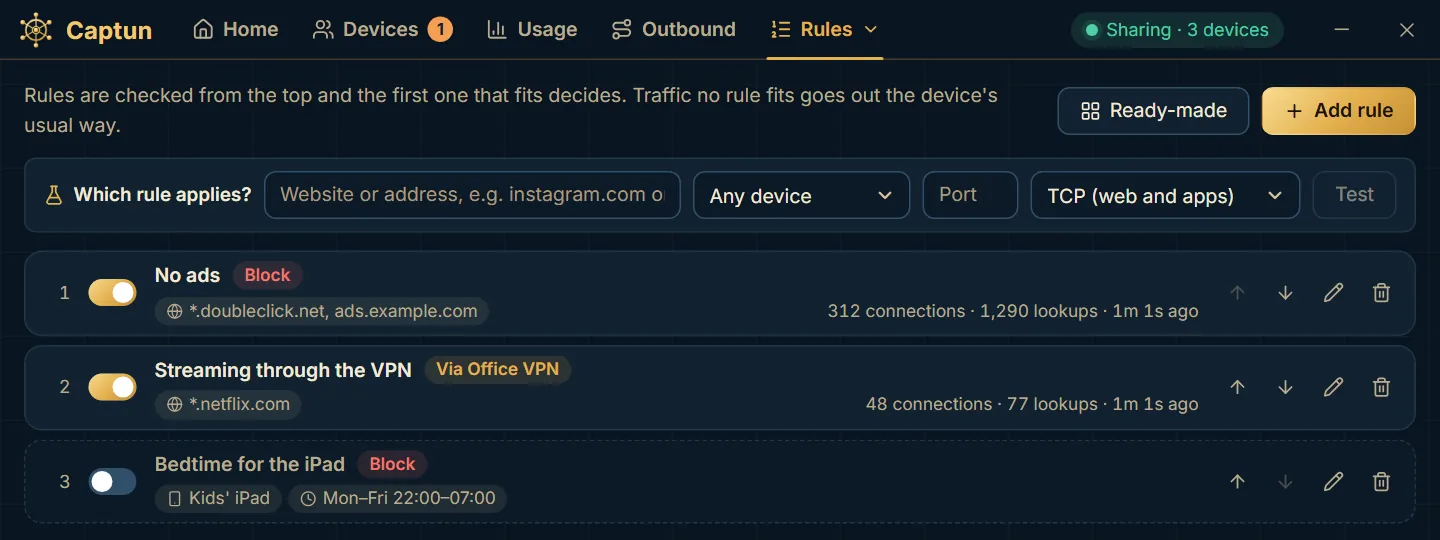
Send one website through the VPN, block ads, or switch the kids' tablet off at bedtime. The first rule that fits decides.

  • By device, website name, address range, port, protocol and time of day.
  • Ready-made rules for ad blocking and popular apps.
  • Online block lists, updated only when you press Update lists.
  • A tester that shows which rule applies to a website.
The Rules page: a rule that blocks ads, one that sends a streaming site through the VPN and a bedtime rule for a tablet

Its own DNS server, with ad blocking

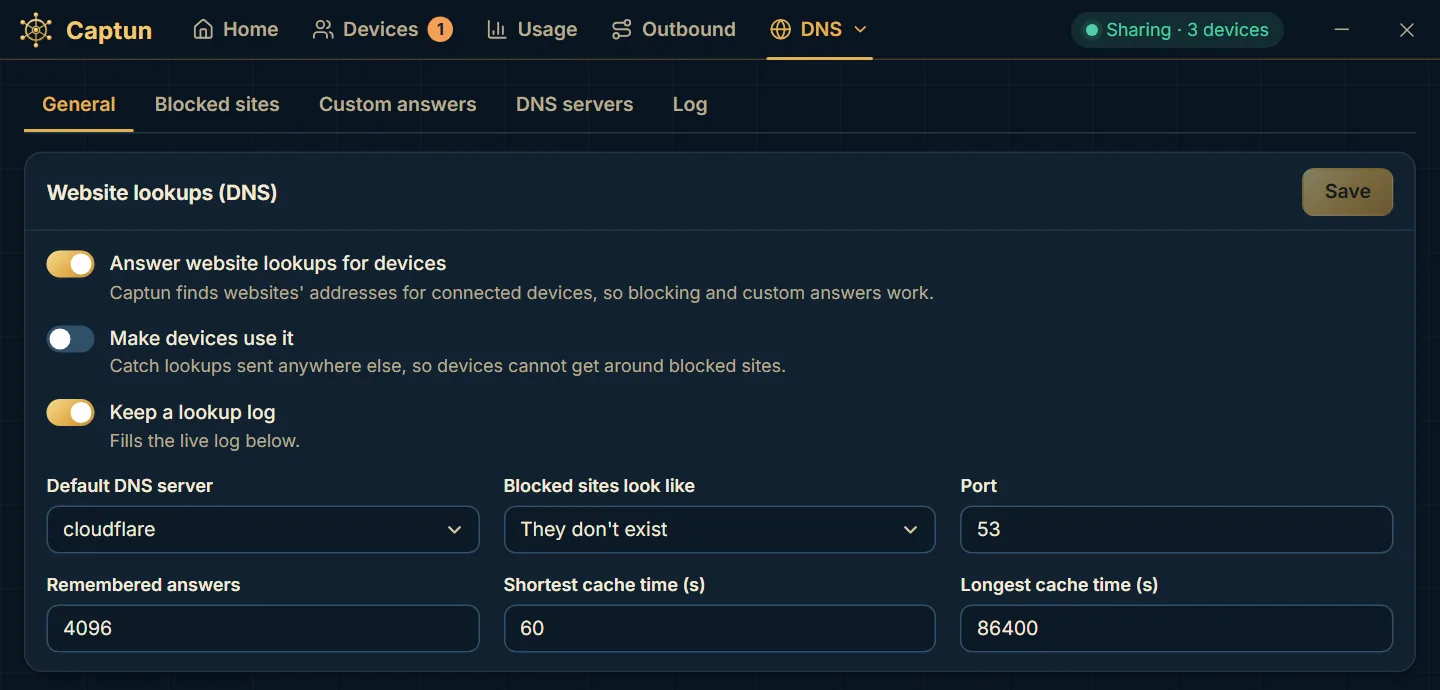
Captun answers website lookups for your devices, so blocking and your own answers work on all of them.

  • A cache, block lists and custom answers for the names you choose.
  • DNS servers over UDP, TCP, DNS over TLS or DNS over HTTPS, for each device.
  • An option to make devices use it, so they can't get around blocked sites.
  • A live lookup log, if you turn it on.
Captun's DNS settings: answering lookups for devices, the default DNS server and how blocked sites look

What each device usedExperimental

Per hour or per day, for one device or all of them, as a chart or a table.

  • Data allowances per day, week or month: for example 2 GB a day, then slowed down.
  • Speed limits for each device, each group or every device together.
  • Downloads and uploads counted apart.
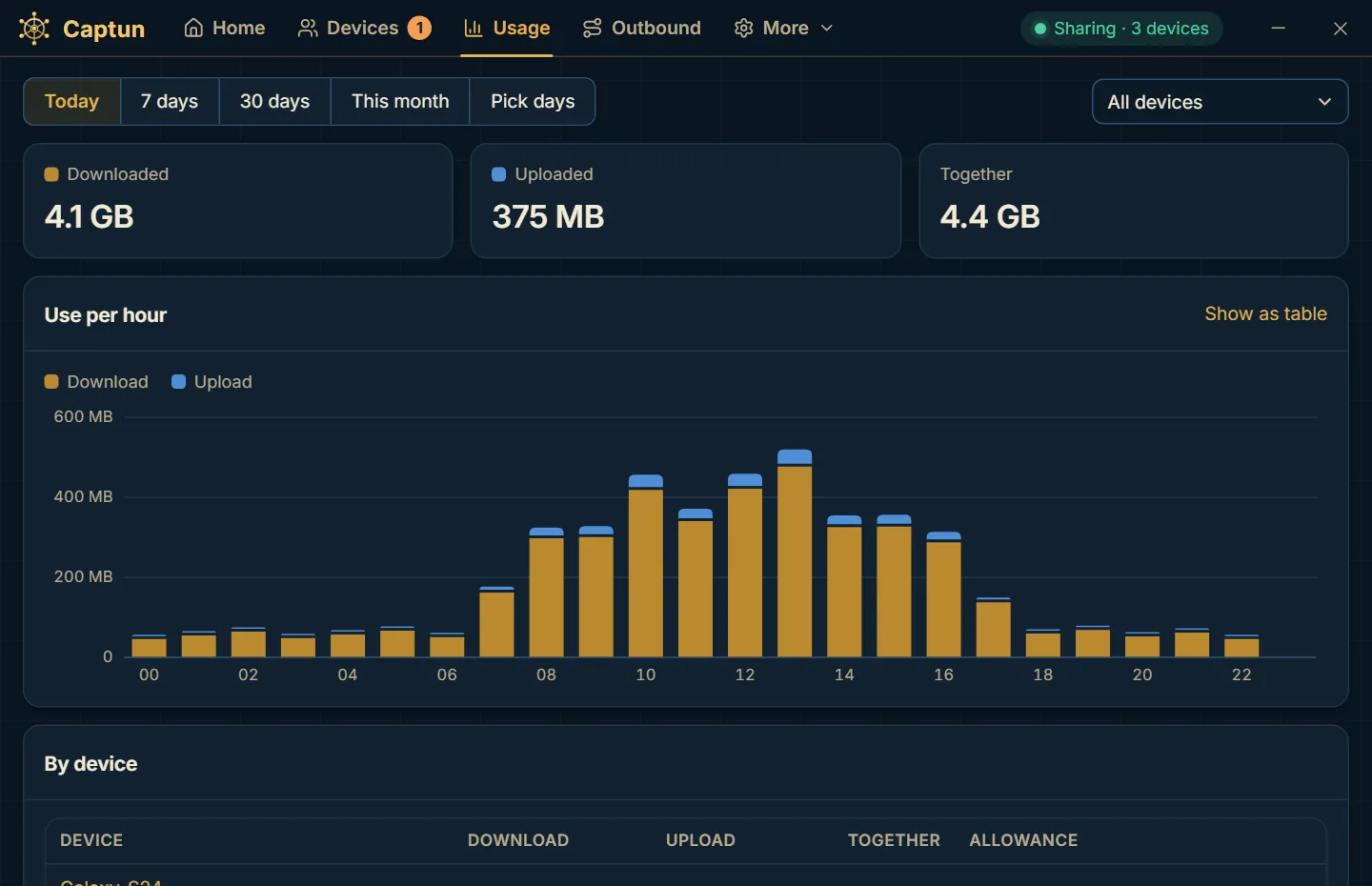
The Usage page: what all devices downloaded and uploaded today, hour by hour

Experimental: per-device ways out, rules, speed limits, data allowances, live speeds and the usage history need “Route devices through Captun”, Captun's own routing engine, which is still experimental.

Coming next

Built, now being tested

These are already in Captun's code and pass its tests. They come with the next version, once they have been tried on real computers.

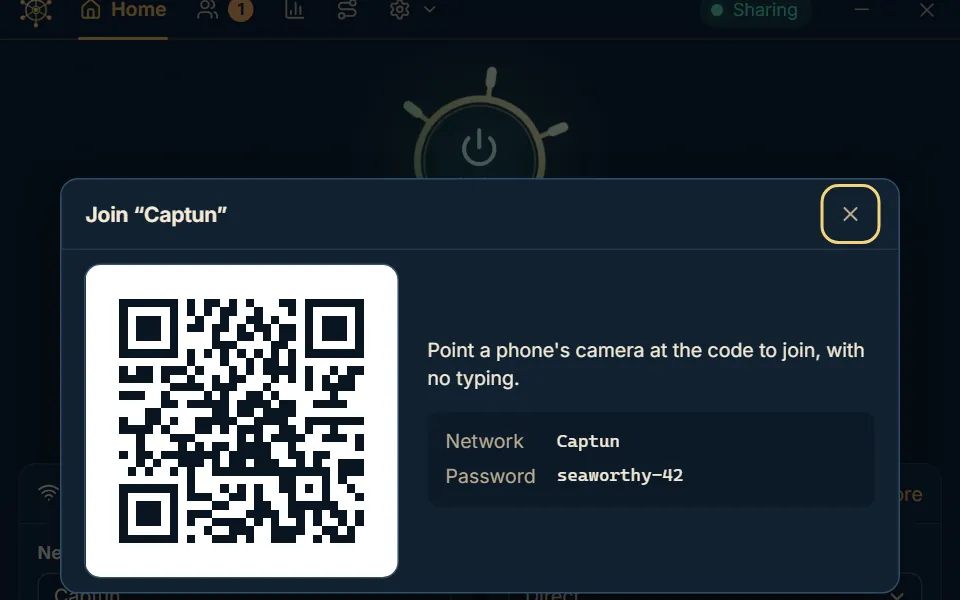
Captun showing a QR code that joins the “Captun” network, with its name and password

Join with a QR code

Phones scan a code to join the hotspot, with no typing.

The Devices page with a phone, a tablet and a TV, their makers, and a TV paused until later

Know every device

Each device's maker and kind (phone, laptop, TV), from the public list of hardware address prefixes.

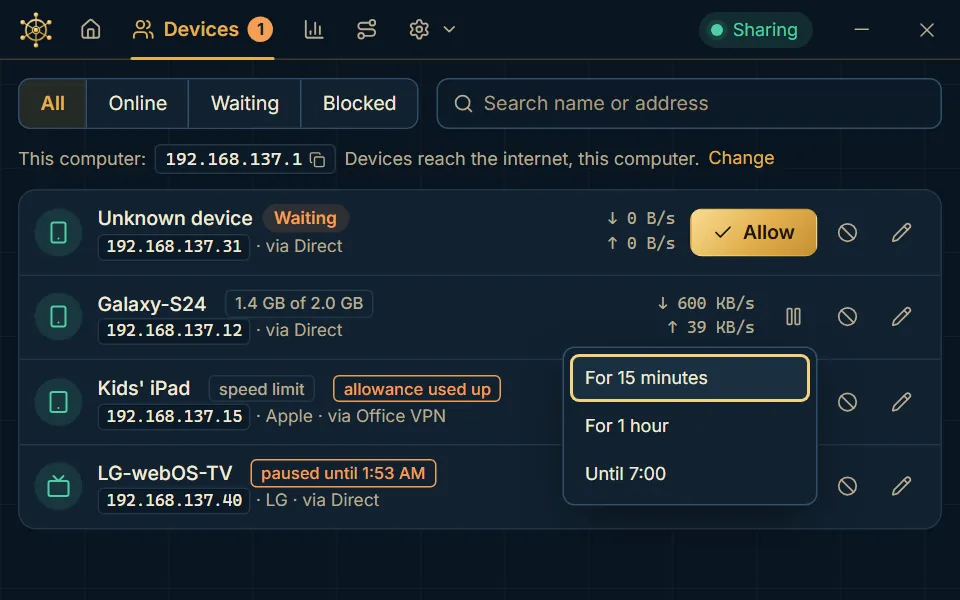
The pause menu of a device: for 15 minutes, for 1 hour, or until 7:00

Pause a device, or set its hours

No internet for 15 minutes, an hour or until morning, or internet hours with none at night.

Needs the routing engine
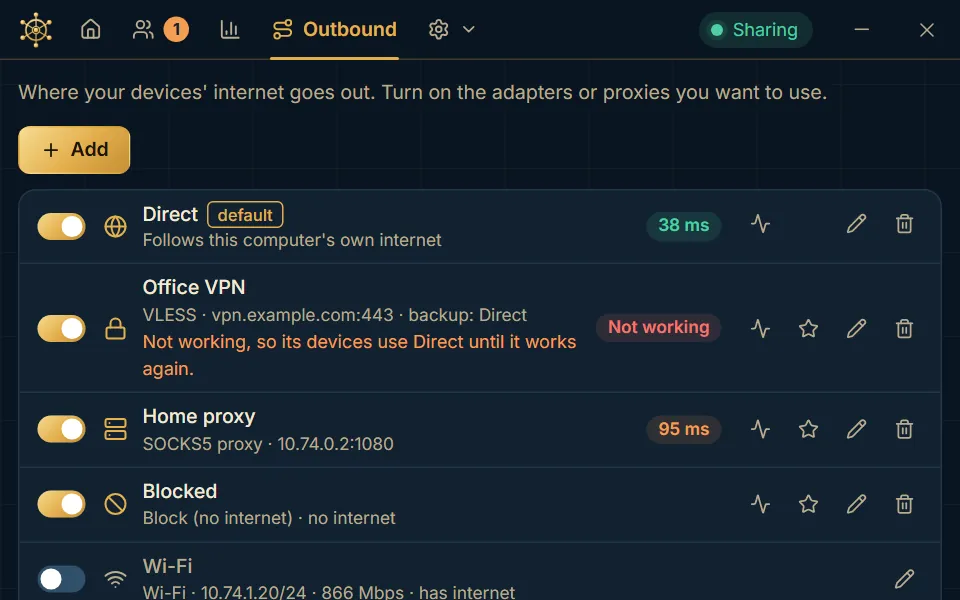
The Outbound page: a VPN that isn't working, so its devices use Direct, and the time each way out takes to answer

A backup way out

Every way out is checked every 30 seconds. Give one a backup, and its devices move there while it isn't working.

Needs the routing engine
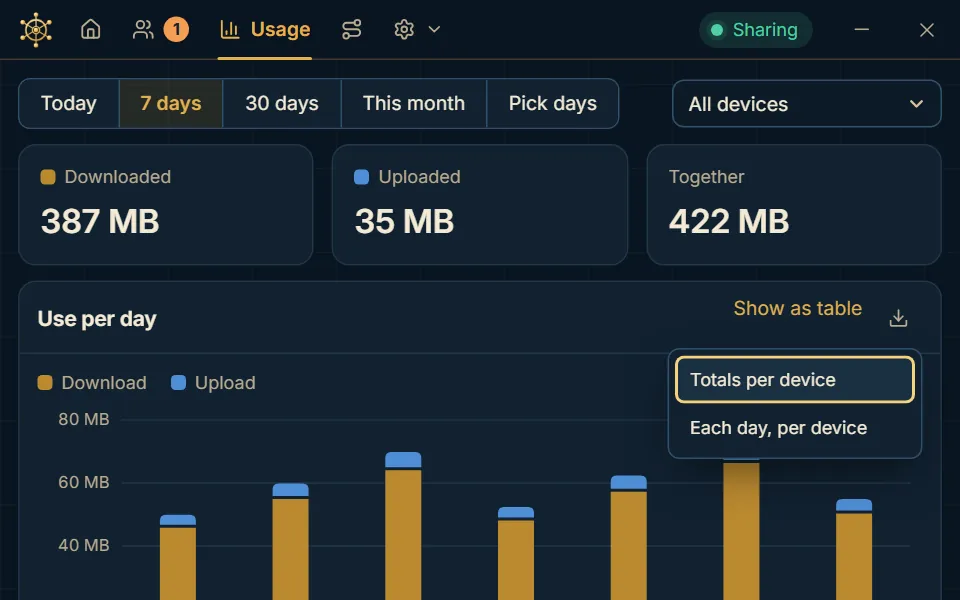
The Usage page for the last 7 days, with the menu to save the totals or each day per device

Usage in a spreadsheet

Save what each device used as a CSV file, for example for a monthly report.

Needs the routing engine
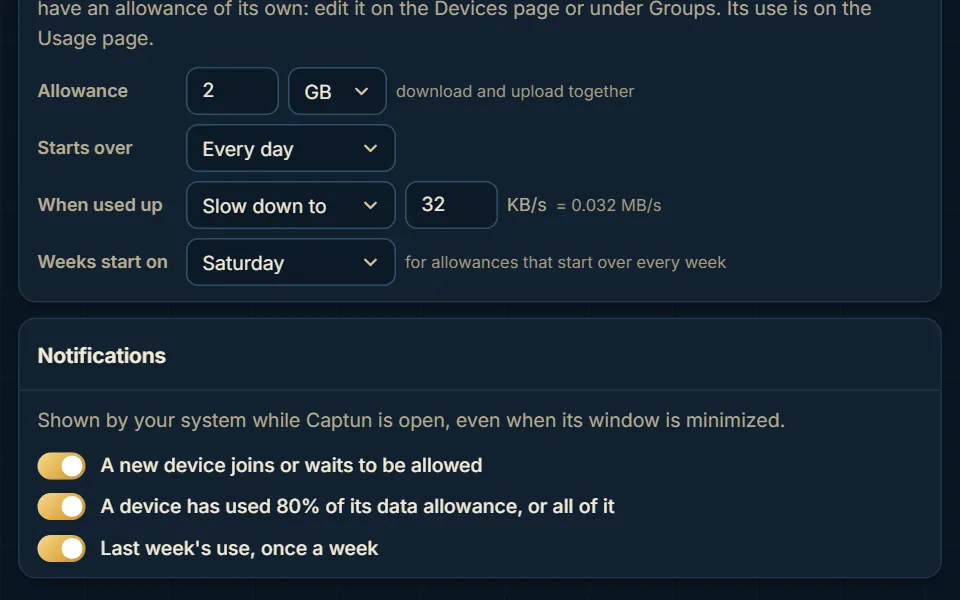
Captun's settings: a data allowance for each device, and the three kinds of notifications

Notifications

When a new device joins or waits to be allowed, when a device has used 80% or all of its allowance, and last week's use. The allowance and weekly ones need the routing engine.

Not on GitHub yet: the version you can build from source today doesn't have them.

Private

Captun steers traffic. It doesn't read it.

It reads only what your rules need, such as the website name a connection asks for.

Contents stay encrypted

What your devices send stays as encrypted as it was. Captun routes it; it doesn't open it.

Settings stay on your computer

No account. Settings are saved encrypted, readable only by your account on that computer.

Not a VPN by itself

Captun doesn't encrypt or hide traffic on its own: that comes from the VPN or proxy you add, for the traffic you send through it.

Platforms

Windows and Linux, macOS on the way

One Rust codebase with a Tauri desktop app.

Windows

Wi-Fi hotspot, cable sharing and USB to an Android phone. Windows' own hotspot takes up to 8 devices by default.

Linux

Wi-Fi hotspot with NetworkManager or hostapd, cable sharing and USB to phone. Little tested on real hardware so far.

macOSIn progress

The code builds, but it hasn't run on a Mac yet.

There is no Android or iOS app: phones, tablets, TVs and consoles connect to Captun, they don't run it.

Get Captun

No release yet. Build it from source.

Captun is under active development. You can build it from source today; the README on GitHub has every step.

  1. Install the tools

    Rust, Node.js 20 or newer and a C compiler, and on Linux libwebkit2gtk-4.1-dev.

  2. Fetch the helpers

    The repository's scripts download Xray-core for VPN links, checked against a pinned checksum, and on Windows the WinDivert driver.

  3. Build and start

    Build the service and start the desktop app. The app starts the service itself, with an administrator prompt.

  • The app is in English.
  • Builds include Xray-core for VPN links, libusb for the built-in adb and, on Windows, WinDivert. Their licences are listed in the README.
  • Found a problem? Open an issue on GitHub.
Help

Questions and answers

Can I share my VPN connection over a Wi-Fi hotspot?

Yes. Choose the VPN's network adapter, a proxy, or a VPN link you paste (VLESS, VMess, Trojan, Shadowsocks, Hysteria2) as the way out for a device or for everyone. Choosing it per device uses Captun's routing engine, which is still experimental.

Does USB tethering to the phone need root or an app?

No. Turn on USB debugging on the Android phone and plug it in; Captun's built-in adb does the rest. The phone uses your computer's internet, never the other way round. Web and apps work over USB; games and calls don't yet.

Can different devices use different connections?

Yes. Each device or group can have its own way out, its own DNS servers, its own speed limit and its own data allowance, and rules can send single websites another way. This uses the experimental routing engine.

Does Captun read my devices' traffic?

No. It routes traffic and reads only what it needs to apply your rules, such as the website name a connection asks for. Contents stay encrypted.

Does Captun make my traffic private?

Not by itself. Captun doesn't encrypt or anonymise anything; the VPN or proxy you add does, for the traffic you send through it.

How many devices can connect?

On Windows, the system's hotspot takes up to 8 devices by default, and Captun has a device limit of its own you can set. It hasn't been tested with large numbers of users.

Which systems does it run on?

Windows and Linux; macOS is in progress. There is no Android or iOS app: phones and tablets connect to Captun.

Where can I download it?

There is no release yet. You can build it from source: the steps are in the README on GitHub.

Is the app in my language?

Not yet: the app is in English. This website is translated so that more people can read about it.